Travelflow

Travel operator software for East Africa

The whole trip, on one file.

Enquiry, flights, camps, SGR, supplier rates, proposal, voucher and invoice. Your desk works from one record, so nobody rebuilds it in a spreadsheet.

We set it up with you · We run it alongside your current process

A day on a travel desk

The work is rarely hard. It is scattered, and that is when mistakes get expensive.

08:40

The rate is in a PDF

A client wants the Mara in February. The contract is somewhere in last year's email, and the season has changed.

11:15

The quote goes out without a margin

Costs are in dollars and shillings across three tabs. You find out what you made after the client has paid.

19:50

The train is in, the driver is not

Pickup was typed by hand. The arrival moved, and the transfer never heard about it.

Less paper, fewer calls

Go paperless. Pick up the phone less.

Every document lives on the trip, and the messages that used to be phone calls go out from it, so the desk stops chasing.

Paperless

  • Quotes as a link and a PDFThe client reads it on their phone and can accept it online.
  • Proof on the trip, not in a drawerTheir LPO, confirmation email, transfer slip or cheque copy is attached to the quote they accepted.
  • Documents made, not typedVouchers, invoices, cash sales, purchase orders and statements come from the trip as PDFs, ready to email.
  • One trip fileEvery document from enquiry to voucher in one place, for whoever picks the trip up next.

Fewer phone calls

  • Prices asked in writingRequest a price from the trip and see who has replied and who is late, without ringing round.
  • The driver gets it on WhatsAppSend the pickup, flight and guest name from the transfer by WhatsApp or SMS.
  • The bell says what is dueA quote to approve, a supplier to pay, money overdue: nobody calls round the office to find out.
  • Suppliers know they are coveredA purchase order or a paid voucher goes with every booking, so they do not call to ask who is paying.

Follow one trip

Seven steps, one record

Enquiry

Email, telephone or your website, all in one list, with the booking name, dates and guests.

Pending enquiriesExample
Honeymoon, Mara and coastWebsite

Inside Travelflow

What your desk sees

Screens from the software, shown with sample data.
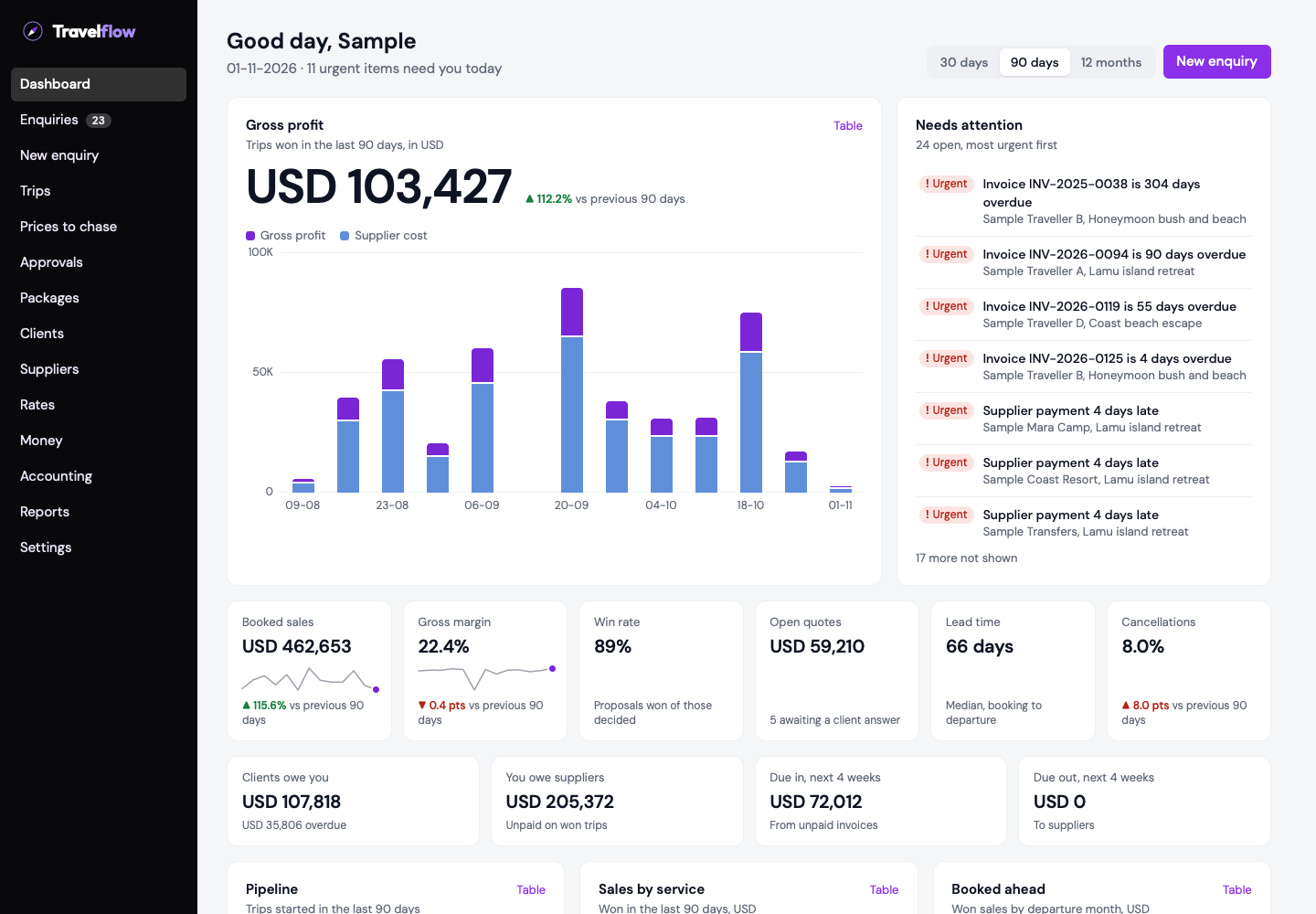
The Travelflow dashboard, showing gross profit, booked sales, margin and a list of urgent items, with sample data.
DashboardSales, margin and what needs attention today.
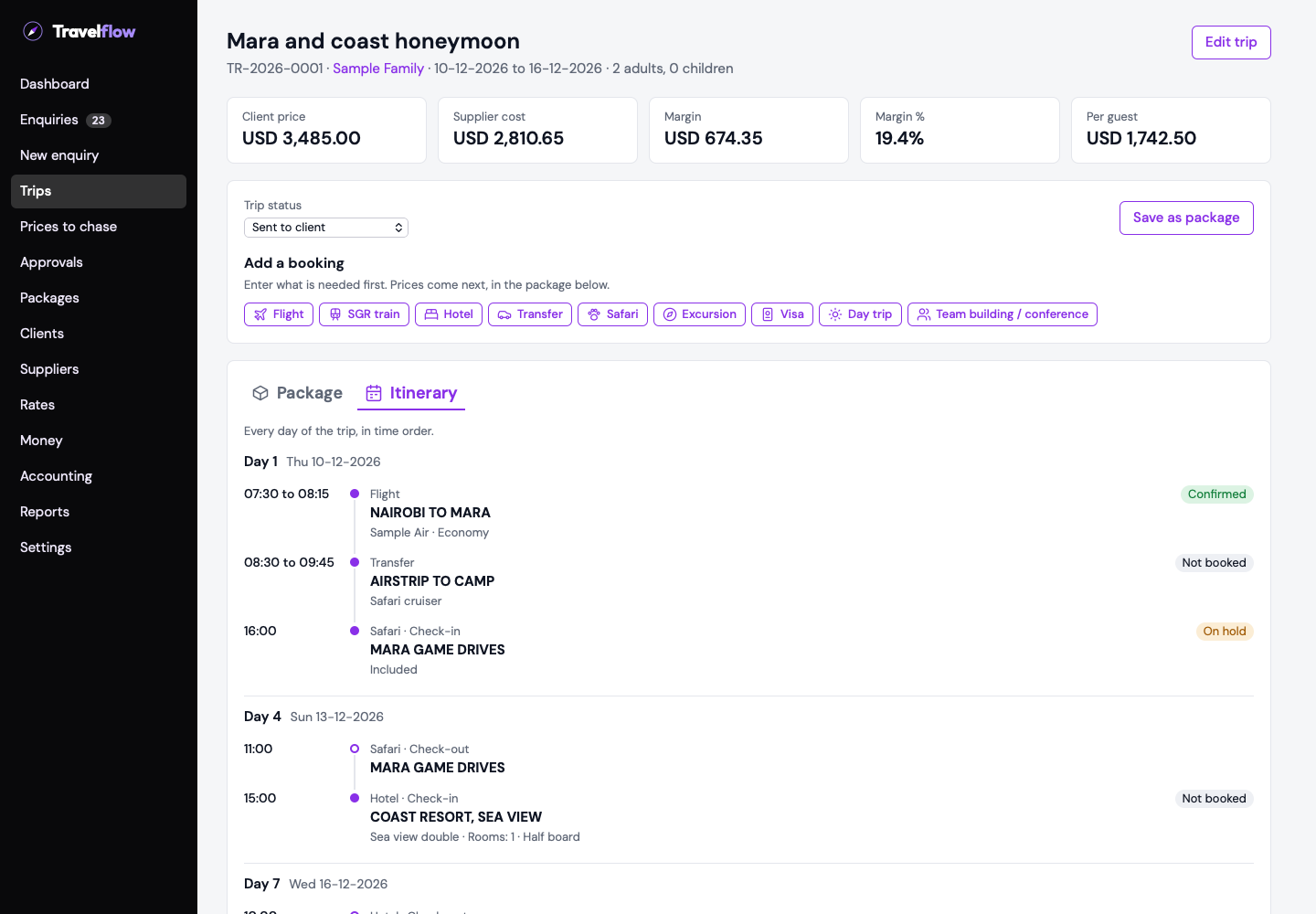
A trip in Travelflow, showing each day of the itinerary in time order with the booking status of each service, with sample data.
ItineraryEvery day of the trip in time order, with each booking's status.

The details

It knows the rules you carry in your head

Each of these started as a real supplier sheet or a real booking problem.

Staying at Sample Mara Camp2 + 2First child free, second at 50%

Child rules that price themselves

Enter every child. If a camp gives the first one free, the quote leaves that child out.

Guests arrive 11-12 at 20:3020:30Mombasa Terminus, SGR

Pickups that follow the arrival

A transfer picks up the flight or train arriving that day and fills in the time and place.

Serengeti park feesBilledTanzania, in the package total
Kenyan park feesAt the gateShown to the client, left out of the total

Park fees handled by country

Priced by visitor type and age. Each fee is either billed on the trip or shown as payable at the gate.

Voyager Beach Resort5 rooms, 5 nightsContract rate, one season

Stays that read the way you say them

Rooms and nights in plain words, with seasons split for you when a stay crosses two.

Cost $397Sell $572Contract rate and customer rate

Your cost and your selling price

Sell at the supplier's customer rate or your own markup. Every line shows both.

Safari cruiser700 kmCharged per km, 2 vehicles
Vehicle lease5 daysCharged per vehicle per day

Safari cruisers and vehicle leases

Charge a cruiser by the kilometre, or lease a vehicle by the day, with the seats, driver and mobile on the booking.

Madaraka ExpressReturnClass, timetable and fare conditions

The SGR booked like a flight

Choose the stations, train and class. Outbound and return stay together as one journey.

Start with the region already loaded

269 researched hotels and lodges across Kenya, Tanzania, Uganda and Rwanda, ready for your own contracts, plus 15 regional flight operators and 10 transfer companies.

SafarisCountry, area, camp, then what that camp offers.
Coast and hotelsRooms, board basis and included services on one stay.
Trains and flightsJourneys that feed the pickup, the itinerary and the voucher.

What is inside

15 modules, one record

Every module works on the same trip, so an enquiry becomes a quote, a booking, an invoice and a line in the books without anyone typing it twice. The screens below are drawn with sample figures.

  1. DashboardWhat needs you today: enquiries waiting, quotes to approve, suppliers to pay, money overdue.
  2. EnquiriesEvery request from email, WhatsApp, phone or your website in one list, with its next step and how long it has waited.
  3. TripsBuild the itinerary, send the quote, record the client's confirmation, and follow one trip file from booking to voucher.
  4. Prices to chaseAsk suppliers for prices from the trip and see who has replied, who is late and what they quoted.
  5. ApprovalsA manager checks each quote before it goes out, and never their own.
  6. PackagesReusable itineraries you copy onto a client and date, and publish with photos on your own booking website.
  7. MarketingOffers with an end date, shared in a tap; past clients who agreed to hear from you; reviews through the client’s own link; and which enquiry sources actually book.
  8. ClientsCash, prepaid, deposit or on account with a credit limit; their balance, statement, and a stop on new bookings when money is long overdue.
  9. SuppliersContacts, services and payment terms; purchase orders to those on account, statements for the rest.
  10. Rates and block bookingsSeasonal contracts entered as one grid, train and airline fares, and block bookings: the rooms or seats you paid for early, with ticket types and taxes.
  11. VehiclesYour own vans, cruisers and drivers on transfers, refused when out, off the road or on leave.
  12. Debtors and creditorsEvery client and supplier by how late they are, to over 120 days. Open one for their statement, or email every client their own statement in one go.
  13. AccountingInvoices, cash sales, credit notes, payments, purchase orders and bank reconciliation post to the books on their own, in your own currency. Profit and loss, balance sheet, trial balance and cash flow, each compared by month, quarter or year, and each one a CSV, PDF or email away.
  14. ReportsWhat is selling, what each consultant sold and what you are making, with sales in other currencies counted at the day’s rate. Download as CSV or PDF, or email it.
  15. SettingsYour company details, users, roles and permissions, and an audit trail of who did what.

Accounting

Books that keep up with the desk

Every invoice, cash sale, payment and supplier bill lands in the books the moment it happens, so month end is a check, not a rebuild.

  • Debtors and creditors on one screen eachEvery client and supplier aged from current to over 120 days, as of any date you choose. Click a name for their statement.
  • Statements to every client at onceTick who gets one and write the message once. Each client receives their own statement with their own balance, and you see who gets what before anything is sent.
  • Credit notes in one placePick the client and the invoice, and Travelflow shows what is left to credit. Every note is numbered, kept and can only be voided with a reason.
  • Cash sales that say what was boughtFlights with the airline, flight and times, stays with nights, room and board, and how the client paid: cheque, transfer or M-Pesa, with the reference.
  • Your currency, every currencyThe books are kept in your own currency, Kenya shillings for most operators. Dollar invoices and bills stay in dollars, every report counts them at the saved rate for the day, and exchange gains and losses post themselves.
  • Every report a click from your inboxProfit and loss, balance sheet, cash flow, trial balance, debtors, creditors, cash sales, purchase orders and the rest: filter it, then download a CSV or PDF, or email it.
  • Your logo on every documentUpload it once and it prints on invoices, cash sales, quotes, vouchers, purchase orders, statements and reports, and shows on your website.
  • Money in, three clear waysRecord an invoice payment, a cash sale payment or a client deposit, each with its own receipt. If a client pays too much, the extra is held for them as unallocated money, not lost in a total.
  • Money out with a voucher numberPay suppliers, purchase invoices and expenses from one Make payment screen. Every expense carries its petty cash or payment voucher number.
  • Find any paymentOne search across money in and money out, by name, trip, reference, method or the amount itself, with shillings and dollars in their own columns and totals.
  • Paid in another currencyA dollar invoice paid in shillings? The receipt shows what came in, in which currency, and the rate it was taken at.
  • Your own service chargeAdd your fee to a trip in dollars or shillings. The agreed amount and rate are kept on it, so a later rate change never reprices it.
  • Bank reconciliation, statement by statementEach bank statement is matched once, in order, carrying on from the balance the last one closed at, so a gap or an overlap is caught straight away.
  • Money is recorded in one placeEvery receipt and payment is entered in Accounting by the people allowed to. Consultants see what a client has paid but cannot change it.
  • Bring your old balances acrossLoad your old trial balance, every unpaid client invoice and every unpaid supplier bill from spreadsheets. Nothing posts unless it balances, and a clearing account shows zero when everything is in.

Marketing

Sell the trips you have already built

Your packages already hold the words, prices and photos. Marketing turns them into offers, puts them in front of past clients who said yes, and shows which channels bring bookings, not just enquiries.

  • Offers with an end dateEach published package shows as on sale, ending within a week or ended, so nothing stays advertised after the deal is over. Change the words or photos once, on the package.
  • Share in a tapWhatsApp, Facebook and X open with the offer ready to post. For Instagram, TikTok and YouTube, copy the caption and download the photos. You post it; nothing goes out on its own.
  • Past clients who agreedFind clients by country, what they booked, when they last travelled and what they spent. Record how each one agreed, and only those who did can be exported, as Kenya’s Data Protection Act 2019 requires.
  • Reviews through the client’s own linkTrips that have just ended are listed with a review link for your thank-you email or WhatsApp. Testimonials given another way can be typed in. Nothing shows on your website without the client’s permission and your approval.
  • Where your bookings come fromEnquiries by source for any period: how many came in, how many booked, the booking rate, the sales and the average per booking.

Security and controls

Every step on the record

Every price, approval and payment has a name and a time against it, and the person who checks the work is not the person who did it.

  • Write-only audit trailEvery change is logged, and entries cannot be edited or deleted.
  • Two-person checksNobody can approve their own proposal.
  • Permissions by roleEnforced on the server, not just hidden on the screen.
  • Money stays on the recordMistakes are reversed, never erased.

Read about security

Getting started

Off the spreadsheets, one step at a time.

Nobody switches a travel desk overnight. We set Travelflow up around how you already work, bring your data across, and run alongside your current way of working until your team is ready.

  1. DiscoveryWe go through your business with you: the trips you sell, your main suppliers and contracts, the currencies you work in, and who approves quotes and payments today.
  2. ConfigureTravelflow is set up for your company before anyone uses it.
    • Company details, logo and bank details for invoices
    • Currencies, exchange rates and a bank account for each currency
    • Your own vehicles and drivers, if you run them
    • Users, roles and who approves what
  3. Bring your data acrossWe bring your suppliers and clients across with you. Contract rates and airline timetables load from spreadsheet templates, every season in one file, so your team can keep them up to date themselves.
  4. Train the teamShort sessions for each desk: consultants, managers who approve proposals, and whoever handles the accounts. Each one is taught on a real trip.
  5. Run in parallelReal enquiries go through Travelflow alongside your current process. Differences are found while both are running, not after.
  6. Go liveWhen your team is confident, you load your opening balances from spreadsheets: your trial balance, each client’s unpaid invoices and each supplier’s unpaid bills. Travelflow checks they balance, then becomes the record. Your old spreadsheets stay for reference, and nothing is lost.

Questions operators ask

Can I load my own supplier contracts?

Yes. Seasons, room types, adult and child rates, and customer rates all live under each supplier.

Which currencies does it handle?

USD, EUR, GBP, KES, TZS, UGX, ZAR and AED. Your books are kept in your own currency; invoices, bills and bank accounts in another currency stay in it, and every report counts them at the saved rate for the day.

Can clients enquire online?

Yes. Your website takes enquiries and lets clients build a trip, and each one appears in your pending list.

Does it work outside Kenya?

Tanzania, Uganda and Rwanda are loaded too, and you can add any area, camp or hotel yourself.

See your next trip in it

Send us a real enquiry and we will build it with you, from first message to invoice.

We use these details to reply to you. See our privacy notice.